LIMITATION OF USER RIGHTS WITH IAM PERMISSION BOUNDARY
Overview
After understanding how IAM User, Group, Policy, and Role work in the previous 2 labs, in this lab, we will continue to learn about IAM Permission Boundary.
What is IAM Permission Boundary?
IAM Permission Boundary is an advanced feature that allows us to limit the maximum permissions of a User or Group. Assuming we apply a Permission Boundary that only allows user EC2admin to administer the EC2 service, then that user will not be able to have permissions on any other service, even if assigned a higher permission Policy.
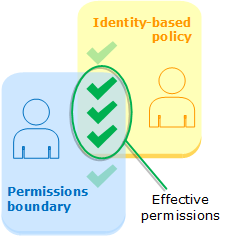
Therefore, the effective permissions of the EC2admin user will include those allowed by both the Permission Boundary and the user EC2admin’s permissions policy (Identity-based policy).
Why use IAM Permission Boundary?
Usually, when you grant permissions to IAM users, you might think that by building the user permissions policy carefully, you can skip using Permission Boundary.
However, as the number of users increases and continuous changes in the work roles of users require you to create more and more new permission policies, the management of permissions becomes complicated, thereby creating vulnerabilities for privilege escalation (privilege escalation) among users.
To simplify permission management, instead of having to edit permission policies individually, you can apply Permission Boundary quickly and in bulk to help you close privilege escalation vulnerabilities.